
How To Renew Plumbing License Online: Official State Portals
Most states require licensed plumbers to renew every one to three years, miss that deadline, and you could face fines, lapsed credentials, or even a work stoppage. The good news: nearly every state now lets you renew plumbing license online through an official portal, often in under 30 minutes.
But finding the right portal, knowing what documents you need, and understanding your state’s continuing education requirements can eat up more time than the renewal itself. That’s exactly why we put this guide together. At plumbingjobs, we help plumbing professionals navigate every stage of their careers, from finding the right job to staying current with licensing and credentials.
Below, you’ll find a state-by-state breakdown of official online renewal portals, step-by-step instructions for the process, and tips to make sure your license never accidentally lapses.
What you need before you start
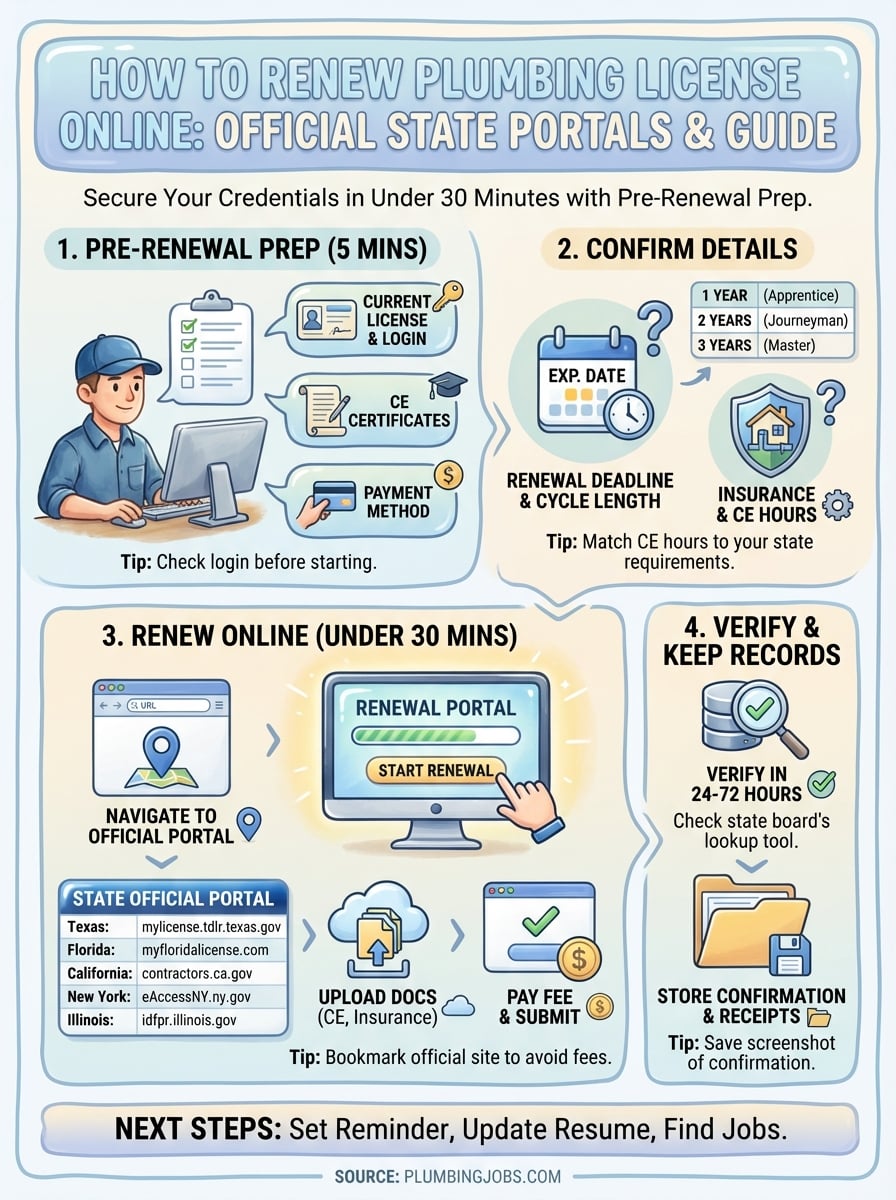
Jumping into the renewal portal without your documents ready is the fastest way to get stuck halfway through the process. Before you renew plumbing license online, spend five minutes pulling these items together so the whole process runs without interruption.
Your license and account information
You’ll need your current license number and the login credentials for your state’s licensing board portal. If you’ve never logged into the portal before, most states let you create an account using your license number and the last four digits of your Social Security number or your date of birth. Have your email address ready, too, because most portals send a confirmation link before they let you proceed.
If you’ve forgotten your portal login, use the “forgot password” option before calling the board’s helpline – most boards resolve this in minutes through the portal itself.
Continuing education certificates
Most states require you to complete continuing education (CE) hours before your renewal goes through. Requirements vary, but a common standard is eight hours per renewal cycle for journeymen and master plumbers. You’ll need to upload or enter your CE course completion certificates directly in the portal, so download those from your course provider before you open anything.

Here’s what to have on hand for each CE course:
- Course provider name
- Course completion date
- Number of credit hours earned
- Certificate or confirmation number
Payment method
Renewal fees range from $25 to over $200 depending on your state and license class. Most portals accept a credit or debit card, and some accept ACH bank transfers. Have your payment method ready before you open the portal, because many sessions time out after 15 to 20 minutes of inactivity, which means starting over from scratch.
Step 1. Confirm your license type and renewal cycle
Before you renew plumbing license online, you need to know exactly which license you hold and when it expires. States issue different license classes, including apprentice, journeyman, and master plumber, and each class can carry a different renewal deadline and fee. Logging into the wrong portal or selecting the wrong license type wastes time and can result in a rejected renewal.
Find your renewal deadline
Your expiration date appears on your physical license card and inside your state board’s online account. If you can’t find your card, log into your state’s licensing portal and look under your profile or license details. Most boards display your next renewal date clearly on the dashboard.
Do not assume your renewal cycle matches a colleague’s – even plumbers in the same company and same state can have different expiration months depending on when they originally passed their exam.
Check your state’s cycle length
Renewal cycles vary by state. The table below shows common patterns:
| Cycle length | Common examples |
|---|---|
| 1 year | Some apprentice licenses |
| 2 years | Many journeyman licenses |
| 3 years | Several master plumber licenses |
Knowing your cycle length helps you plan CE completion well before the deadline.
Step 2. Gather login, CE, and insurance details
Once you know your license type and renewal deadline, the next task is pulling together everything the portal will ask for. Many plumbers try to renew plumbing license online and hit a wall mid-session because they’re missing insurance certificates or CE completion records. Collecting these details upfront keeps the process moving without interruption.
Check your insurance documentation
Several states require proof of general liability insurance before they approve your renewal. Pull your current certificate of insurance from your provider and confirm the policy expiration date extends beyond your renewal submission date. If it doesn’t, contact your insurer to update the policy before you open the portal.
Submit your insurance certificate as a PDF rather than a photo – most portals reject low-resolution image uploads and will flag your application as incomplete.
Confirm your CE records are complete
Log into your CE provider’s website and download every completion certificate from the current renewal cycle. Cross-reference those certificates against your state board’s required CE hours to confirm you’ve met the minimum before you start.
Here’s a quick checklist to confirm you’re ready:
- State portal login credentials
- CE completion certificates in PDF format
- Certificate of insurance
- Credit card or bank details for the renewal fee
Step 3. Renew through official state portals
With your documents ready, you can renew plumbing license online through your state’s official licensing board website. Each state runs its own portal, so going directly to the correct URL avoids third-party sites that charge extra fees for a process you can complete at no added cost.
Navigate to your state’s official portal
Your state’s licensing board website is the only place you should complete this process. Use the table below to find the direct portal for your state’s plumbing license renewals:
| State | Official Portal |
|---|---|
| Texas | mylicense.tdlr.texas.gov |
| Florida | myfloridalicense.com |
| California | contractors.ca.gov |
| New York | eAccessNY.ny.gov |
| Illinois | idfpr.illinois.gov |
Bookmark the official portal URL directly from your state board’s homepage to avoid landing on third-party sites that charge processing fees for a free government service.
Complete and submit the renewal form
Once you log in, the portal walks you through each required field in sequence. Upload your CE certificates and insurance documents when prompted, then confirm your contact and business address details are current before you hit submit. Pay the renewal fee last, and save your confirmation number immediately after the payment screen clears.
Step 4. Verify your renewal and keep records
After you renew plumbing license online, don’t close the browser and consider it done. Confirming your renewal actually processed correctly takes two minutes and protects you if an employer or inspector ever questions your credentials.
Check your board’s license lookup tool
Most state licensing boards update their public license lookup database within 24 to 72 hours of a completed renewal. Search your name or license number on your state board’s website to confirm your expiration date reflects the new renewal cycle.
Save your renewal confirmation number as a screenshot. It’s your proof of submission if the board’s system experiences a delay.
If your record still shows the old expiration date after 72 hours, call the board directly with your confirmation number ready. Don’t wait longer than a week, because you may need your updated record before your next job starts.
Store your renewal documents
Keep a dedicated folder, digital or physical, for your license renewal records. At minimum, store these items:
- Renewal confirmation email
- Payment receipt
- CE completion certificates
- Updated license certificate or card
Your employer or general contractor may request copies at any time, so having everything organized in one place prevents scrambling when a new job kicks off.
Next steps after you renew
Once you renew plumbing license online and confirm your updated record on the board’s lookup tool, shift your focus forward. Set a calendar reminder for your next renewal deadline the same day you close the portal so you never enter a cycle scrambling for CE credits at the last minute. Also update your resume, job profiles, and employer records with your new expiration date right away to keep everything consistent.
Your updated credentials open real doors. New job opportunities in the plumbing industry move quickly, and employers actively seek licensed professionals whose paperwork is current. Start your next CE course early, keep your insurance policy active, and check your state board’s website for any rule changes before your next cycle begins.
With your license current, the right position is the next goal. Visit the PlumbingJobs.com blog for more industry resources, or start browsing open positions with employers who are actively hiring licensed plumbers right now.
Want plumbing jobs delivered to your inbox?
Want plumbing jobs delivered to your inbox?
Partner Site

